Conquering the Annoying CORS
CORS??? What even is this?
Overview
When developing web applications, you often encounter 'CORS policy' errors like the one below.

The goal of this post is to understand CORS.
Web Origin and Same Origin Policy
Web Origin and Same Origin Policy are expressions that appear in the RFC-6454 (2011.12) document managed by the Internet Engineering Task Force (IETF).
The Web Origin Concept
This document defines the concept of an "origin", which is often used as the scope of authority or privilege by user agents. Typically, user agents isolate content retrieved from different origins to prevent malicious web site operators from interfering with the operation of benign web sites. In addition to outlining the principles that underlie the concept of origin, this document details how to determine the origin of a URI and how to serialize an origin into a string. It also defines an HTTP header field, named "Origin", that indicates which origins are associated with an HTTP request.
... from rfc6454
Principles of the Same-Origin Policy
Many user agents undertake actions on behalf of remote parties. For example, HTTP user agents follow redirects, which are instructions from remote servers, and HTML user agents expose rich Document Object Model (DOM) interfaces to scripts retrieved from remote servers. Without any security model, user agents might undertake actions detrimental to the user or to other parties. Over time, many web- related technologies have converged towards a common security model, known colloquially as the "same-origin policy". Although this security model evolved largely organically, the same-origin policy can be understood in terms of a handful of key concepts. This section presents those concepts and provides advice about how to use these concepts securely.
... from rfc6454
Same-Origin Policy is a security policy where User Agents (= browsers) must only communicate with the same Web Origin. For example, browsers have the responsibility to prevent XHR requests from https://blog.wichan.dev to https://google.com.
Cross Origin Resource Sharing
While SOP was important for security, an exception policy called CORS was added because there were frequent cases where calling resources from different domains was useful. CORS is a policy created to share resources between different domains (Cross-Origin).
Three Scenarios of CORS Communication
Simple Requests
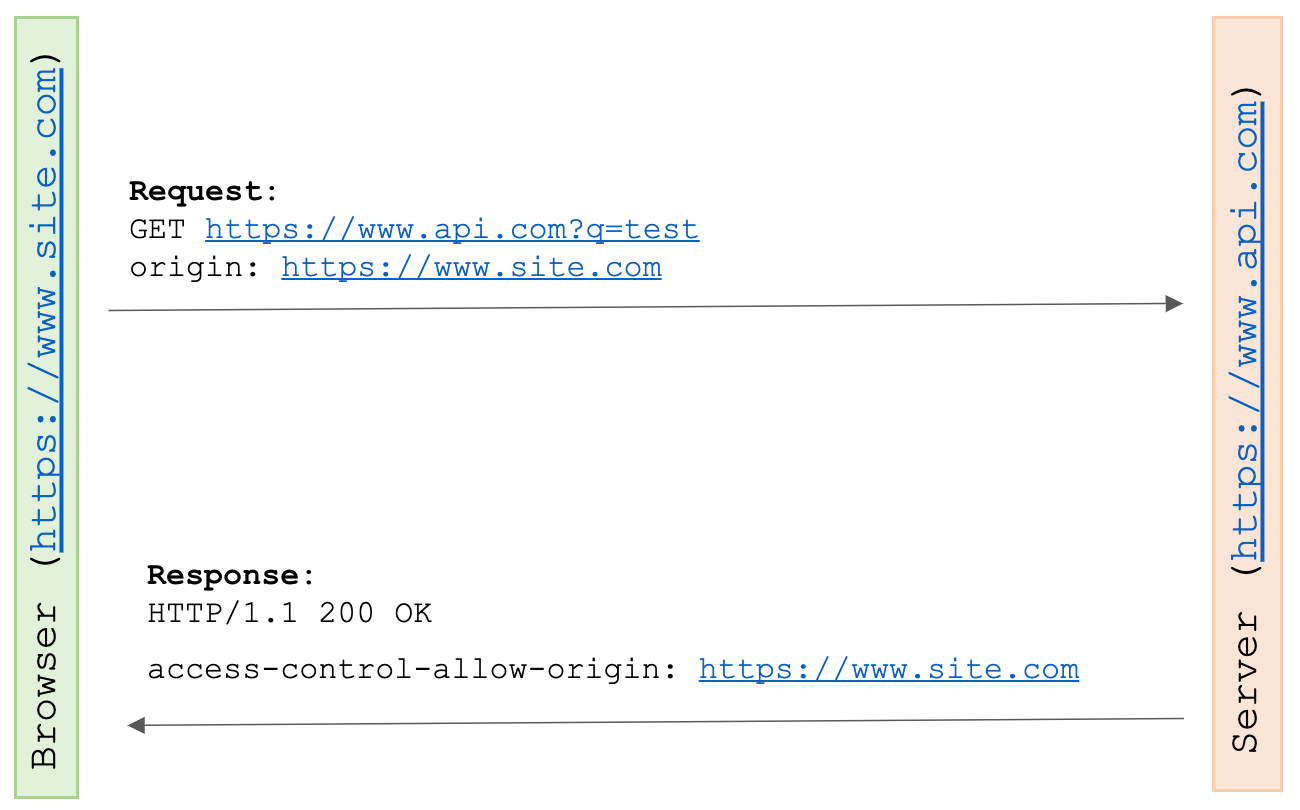 If all the following conditions are met, the browser operates as Simple-Requests.
- GET, HEAD, POST requests
- Requests containing only browser headers like Accept, Accept-Language, Content-Language, Content-Type
- Requests containing only CORS Safelisted headers
- ... etc. (details are in the original source)
The browser includes an Origin header in the HTTP request, and the server includes the SOP exception domain in the response access-control-allow-origin header. The browser compares the Request's Origin with access-control-allow-origin, processes normally if they match, and discards if they don't.
Non-Simple Requests
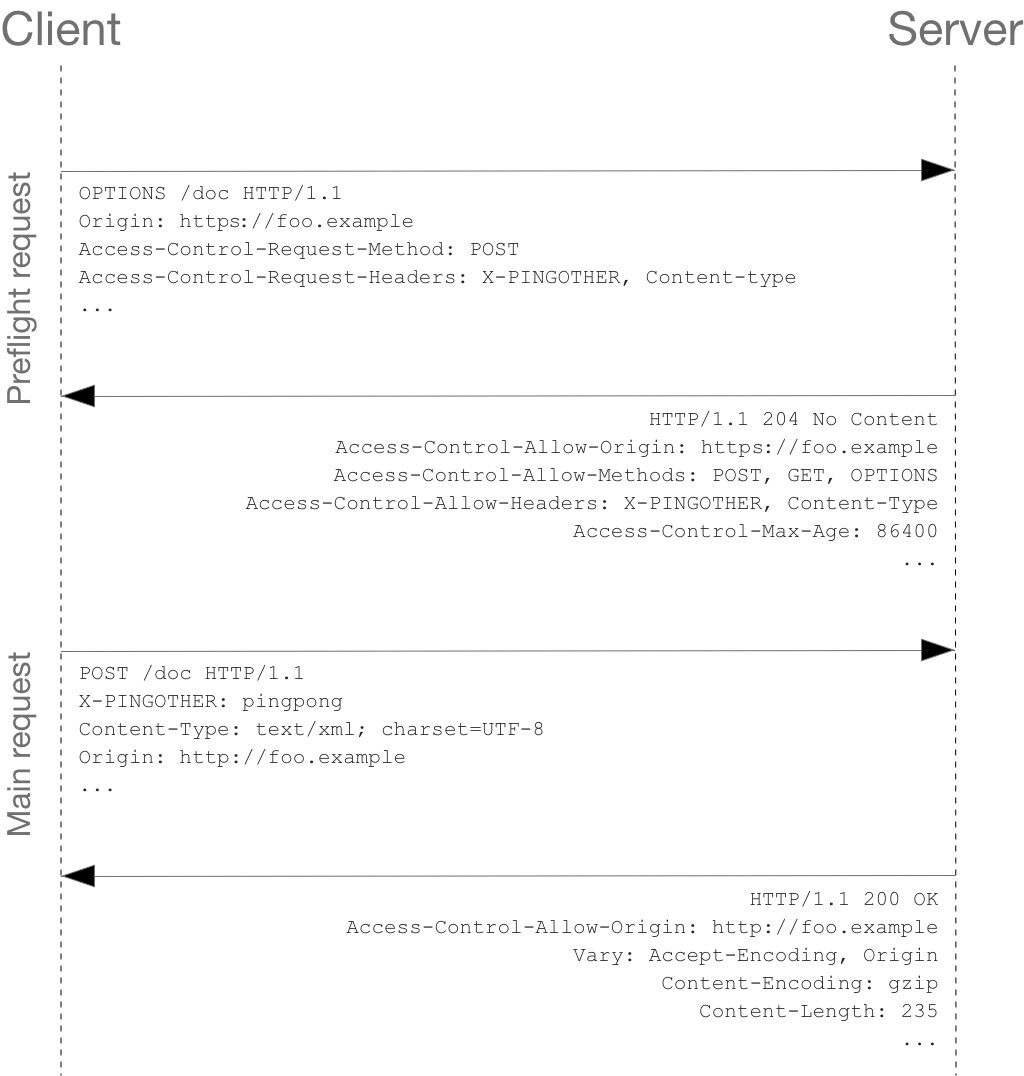 If the request is not included in Simple-Requests, a process called Pre-flight request is added.
The browser performs an OPTION request to receive access-control-allow-origin before the actual Request.
This is the Pre-flight request. If pre-flight is successful, the actual request is performed afterward.
If the request is not included in Simple-Requests, a process called Pre-flight request is added.
The browser performs an OPTION request to receive access-control-allow-origin before the actual Request.
This is the Pre-flight request. If pre-flight is successful, the actual request is performed afterward.
Credentialed Requests
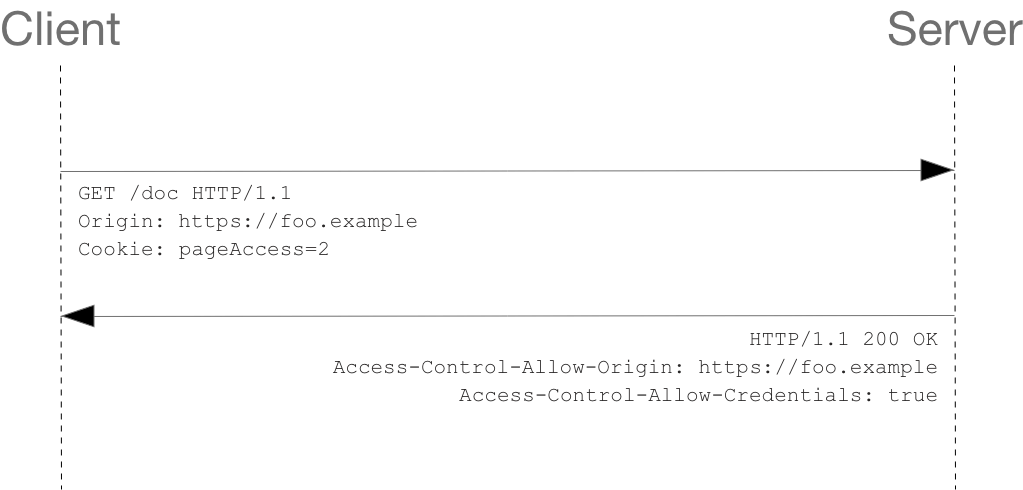 Basically, to CORS authentication information like Cookies or Authorization, the server cannot just respond with access-control-allow-origin.
The browser must use the credentials option when making a Request, and the server must respond with an access-control-allow-credentials:true header and an access-control-allow-origin header with a domain specified (not a wildcard).
Basically, to CORS authentication information like Cookies or Authorization, the server cannot just respond with access-control-allow-origin.
The browser must use the credentials option when making a Request, and the server must respond with an access-control-allow-credentials:true header and an access-control-allow-origin header with a domain specified (not a wildcard).
Conclusion
CORS is a policy needed when browsers and servers need to communicate as SOP exceptions. Ultimately, since SOP is a browser-server policy, CORS error messages don't occur in server-server communication.
For your own service, you can handle it using cors-related libraries provided by frameworks, and for XHR calls to other services, there are methods like configuring a Proxy.