Hosting a Minecraft Server 24/7 in the Cloud
I'm not a kid, okay?
Overview
My friends and I are 26 years old (born in 1999), but our mental age still lingers around high school days.
We decided to play Minecraft together, but unlike in high school, we now have our own schedules, making it difficult to find time to play together. We needed a Minecraft server that we could access anytime we wanted.
Today's story is about hosting a Minecraft server in the cloud.
First Attempt
Can it work with Amazon EC2 free-tier limits?
I wanted to provide a Minecraft server 24/7, so I planned to host it on AWS, which I'm familiar with. Since I didn't want to spend money, I wanted to keep it within the free-tier limits.
Minecraft Java Edition server requires at least 1GB of available RAM.
AWS EC2 offers t2.micro computing for free, but t2.micro only provides 1GB of RAM, so after running the OS, very little available RAM remains. (https://aws.amazon.com/ec2/instance-types/t2/)
So...
I needed better specifications, and Amazon Lightsail seemed like it could solve this problem.
Lightsail is a computing service that provides a more user-friendly interface than EC2. It's a service Amazon seems to be pushing, offering quite decent performance computing for free.
| cpu | memory | storage | transfer |
|---|---|---|---|
| 2 vCPUs | 2 GB Memory | 60 GB SSD Storage | 3 TB Transfer |
Let's try with Lightsail.
Lightsail Setup
Although it's a service for friends, I wanted to provide a comfortable experience.
So I decided to try running it in a Linux environment, which I hadn't done before, and chose Ubuntu OS.
Minecraft uses port 25565 by default, so I allowed inbound traffic on port 25565.
Ubuntu Setup
Since I'm getting familiar with Docker lately, I installed Docker first.
sudo apt-get update

sudo apt-get install apt-transport-https ca-certificates curl gnupg-agent software-properties-common

curl -fsSL https://download.docker.com/linux/ubuntu/gpg | sudo apt-key add -

sudo add-apt-repository "deb [arch=amd64] https://download.docker.com/linux/ubuntu $(lsb_release -cs) stable"

sudo apt-get update

sudo apt-get install docker-ce docker-ce-cli containerd.io

sudo systemctl status docker
Pull Minecraft Server Image
Someone has already made a well-crafted Minecraft server image. I downloaded the stable version.
docker pull itzg/minecraft-server:stableWrite docker-compose
Using latest or stable versions will automatically upgrade when new server versions are released.
services:
  mc:
    image: itzg/minecraft-server:stable
    tty: true
    stdin_open: true
    ports:
      - "25565:25565"
    environment:
      EULA: "TRUE"
    volumes:
      # attach the relative directory 'data' to the container's /data path
      - ./data:/data
Verification
docker-compose up -d
docker-compose ps
docker ps
I checked that the server was running well with 1GB RAM using java -Xms1G -Xmx1G in the mounted ./data/logs.
So did it work well?
When two of us connected and tested, it was comfortable and ran well at first, but problems occurred when using elytra items.
When using elytra, which provides fast movement, chunk loading was requested rapidly, causing RAM shortage.
Let's think of a better method.
Second Attempt
Since RAM was insufficient, I wanted to reduce the overhead caused by using Docker and utilize Linux swap memory to fill the insufficient RAM.
Install openjdk
apt install openjdk-22-jre-headless
java --version
Download minecraft-paper
I heard that minecraft-bukkit, which I used 10 years ago, has been discontinued.
I heard that the performance of the newly released Paper is good, so I downloaded the Paper server launcher.
Swap Memory Setup
Since storage is plentiful, let's try 20GB flex.
sudo fallocate -l 20G /mnt/swapfile

sudo chmod 600 /mnt/swapfile

sudo mkswap /mnt/swapfile

sudo swapon /mnt/swapfile

sudo swapon --show
Memory Flex
java -Xms4G -Xmx16G -jar paper-1.21-106.jarSo did it work well?
First, the perceived performance was worse than the first attempt, which I think is due to overhead from using swap memory.
Although SSD is fast, the access time difference between memory and secondary storage was clear, and CPU work for swap memory switching operations was inevitable. Accordingly, I could see that more CPU was being used than in the first attempt.
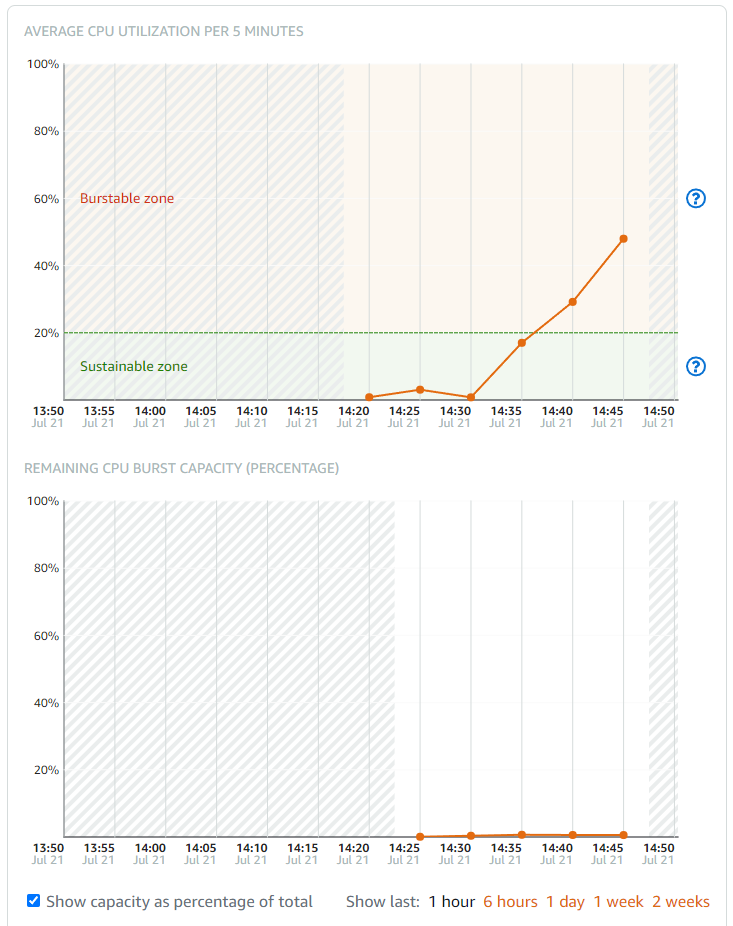
When no players were connected, CPU usage stayed at around 12%, but when one player connected and was active, CPU usage soared to around 50%. Of course, I didn't test with multiple players, but assuming one or more players play for more than 6 hours a day, the CPU burst credit usage rate was not sustainable at all.
Since the performance was lower and the method was not sustainable, the second attempt also ended in failure.
Third Attempt
Azure offers $200 credit for one month.
It worked well. Money is the best.