Building a Kubernetes Cluster 'Directly'
A tearful story
Provisioning
What is Provisioning...
It refers to allocating, placing, and deploying system resources according to user requirements, and preparing the system in advance so that it can be used immediately when needed.
Choosing a Provisioning Method
There are three famous methods for provisioning k8s.
- kubernetes
Directly install and configure various cluster components. - kubeadm
It's a bootstrap tool that helps easily implement k8s.
It's a k8s implementation tool officially supported and updated by k8s. - kops
Like kubeadm, it's a bootstrap tool for easy implementation, but it's a tool that helps easily install k8s on 'cloud platforms'.
We'll use kubeadm, which has many references and is introduced on the official homepage.
Before Starting...
Although I only worked on weekends, I did a lot of troubleshooting even in simple setup for a month.
The order and method introduced below were written with tears.
AWS Instance Configuration
Instance Specifications
I created 3 instances as follows.
Master, t3.xlarge, 20GiB EBS, redhat
Worker1, t3.medium, 20GiB EBS, redhat
Worker2, t3.medium, 20GiB EBS, redhat
I recommend at least t3.medium for Master nodes. (kube-master recommendation is 2cpu, 4GB ram.)
Workers can use t2.micro which is available for free.
Instance Security Groups
master inbound
| protocol | port | target | description |
|---|---|---|---|
| UDP | 8285 | 172.31.48.0/20 | Flannel |
| UDP | 8472 | 172.31.48.0/20 | Flannel |
| TCP | 22 | 0.0.0.0/0 | ssh |
| TCP | 10252 | 172.31.48.0/20 | kube-controller-manager (used by Self) |
| TCP | 10250 | 172.31.48.0/20 | Kubelet API (used by Self, Control plane) |
| TCP | 6443 | 172.31.48.0/20 | Kubernetes API Server (used by All) |
| TCP | 10251 | 172.31.48.0/20 | kube-scheduler (used by Self) |
| TCP | 2379-2380 | 172.31.48.0/20 | Etcd server client API (used by kube-apiserver, etcd) |
worker inbound
| protocol | port | target | description |
|---|---|---|---|
| UDP | 8285 | 172.31.48.0/20 | Flannel |
| UDP | 8472 | 172.31.48.0/20 | Flannel |
| TCP | 22 | 0.0.0.0/0 | ssh |
| TCP | 30000 - 32767 | 0.0.0.0/0 | NodePort Services (used by All) |
| TCP | 10250 | 172.31.48.0/20 | Kubelet API (used by Self, Control plane) |
I changed all target cidr except NodePort and SSH to 172.31.48.0/20, which is the VPC subnet.
yum Configuration and Basic Installation File Download
Repeat the same process on master and worker nodes respectively.
yum update
sudo yum update -ySetting up yum repository for essential installation file download
Set up repo for docker, containerd installation.
cd /etc/yum.repos.d
sudo wget https://download.docker.com/linux/centos/docker-ce.repo
Set up repo for kubectl, kubeadm, kubelet installation.
cat <<EOF | sudo tee /etc/yum.repos.d/kubernetes.repo
[kubernetes]
name=Kubernetes
baseurl=https://packages.cloud.google.com/yum/repos/kubernetes-el7-x86_64
enabled=1
gpgcheck=1
repo_gpgcheck=1
gpgkey=https://packages.cloud.google.com/yum/doc/yum-key.gpg https://packages.cloud.google.com/yum/doc/rpm-package-key.gpg
exclude=kube*
EOF
Essential Installation File Installation
docker-ce, containerd, kubeadm, kubectl, kubelet
sudo yum install containerd.io
sudo yum install kubelet kubeadm kubectl --disableexcludes=kubernetes
Linux Configuration Changes
Change Selinux setting to permissive mode
sudo setenforce 0
sudo sed -i 's/^SELINUX=enforcing$/SELINUX=permissive/' /etc/selinux/config
sudo systemctl enable --now kubelet
Swap off
When using Linux's own Swap function, Kubernetes resource management (pod placement, etc.) operates abnormally.
sudo swapoff -a
sudo sed -e '/swap/ s/^#*/#/' -i /etc/fstab
Containerd Configuration
Load modules for containerd
cat <<EOF | sudo tee /etc/modules-load.d/containerd.conf
overlay
br_netfilter
EOF

sudo modprobe overlay
sudo modprobe br_netfilter
Set sysctl parameters for containerd
// Setting necessary sysctl parameters will persist after reboot.
cat <<EOF | sudo tee /etc/sysctl.d/99-kubernetes-cri.conf
net.bridge.bridge-nf-call-iptables  = 1
net.ipv4.ip_forward                 = 1
net.bridge.bridge-nf-call-ip6tables = 1
EOF

// Apply sysctl parameters without reboot
sudo sysctl --system
containerd config.toml cgroup configuration
cd /etc/containerd/config.toml and change to the following content.

version = 2
[plugins]
  [plugins."io.containerd.grpc.v1.cri"]
   [plugins."io.containerd.grpc.v1.cri".containerd]
      [plugins."io.containerd.grpc.v1.cri".containerd.runtimes]
        [plugins."io.containerd.grpc.v1.cri".containerd.runtimes.runc]
          runtime_type = "io.containerd.runc.v2"
          [plugins."io.containerd.grpc.v1.cri".containerd.runtimes.runc.options]
            SystemdCgroup = true
Configure containerd to run on restart
sudo systemctl enable containerd
sudo systemctl restart containerd
Kubernetes Cluster Configuration
kubeadm init
This work is done only on the master node.
--pod-network-cidr should be changed according to CNI configuration.
Flannel is 10.244.0.0/16
Calico is 192.168.0.0/16
We will install Flannel.
sudo kubeadm init \
    --apiserver-advertise-address={master private ip} \
    --pod-network-cidr=10.244.0.0/16 \
    --apiserver-cert-extra-sans={master private ip}
Create kubeconfig file for kubectl commands
This work is done only on the master node.
mkdir -p $HOME/.kube
sudo cp -i /etc/kubernetes/admin.conf $HOME/.kube/config
sudo chown $(id -u):$(id -g) $HOME/.kube/config
worker node join
This work is done only on worker nodes.
sudo kubeadm join {private ip}:6443 --token jle89r.6qqk9qlhx8wozd6p \
        --discovery-token-ca-cert-hash sha256:e37231d3d866429b0caa85b2a9dce668b69d68e016f9981123782d20475131ab
Install Flannel CNI
This work is done only on the master node.
kubectl apply -f https://raw.githubusercontent.com/coreos/flannel/master/Documentation/kube-flannel.ymlTransfer config file to worker nodes with scp
To use kubectl commands on workers, transfer the config file from the master.
scp /home/ec2-user/.kube/config 172.31.32.49:/home/ec2-user/.kubeError Handling
When there are CPU, memory related issues during kubeadm init
kubeadm minimum specification requires cpu2, ram2GB, but t3.micro doesn't meet this minimum specification.
# You can ignore specification related issues with the following option.
--ignore-preflight-erros=NumCPU,Mem
Get kubeadm join token, cert hash value again
kubeadm token list
openssl x509 -pubkey -in /etc/kubernetes/pki/ca.crt | openssl rsa -pubin -outform der 2>/dev/null | openssl dgst -sha256 -hex | sed 's/^.* //'
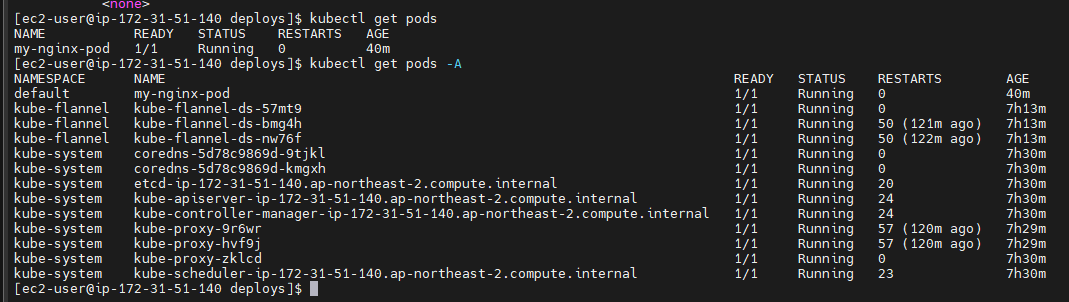
Success