Kubernetes Concept Summary
Let's learn about the beautifully abstracted Kubernetes!
Overview
Kubernetes (hereinafter k8s) is a tool that makes MSA implementation and maintenance easier. For small-scale services, there was no problem managing multiple containers with Docker Compose, Docker Swarm..., but as the scale grew, difficulties arose in managing many containers.
Unlike existing orchestration tools, k8s manages services with the concept of 'state'. It defines the 'state' that the service should maintain in a Config yaml file, and k8s manages it so that the state can be maintained... Since I only heard the concept, I don't know how it works, so let's move on for now.
Drawing the Configuration
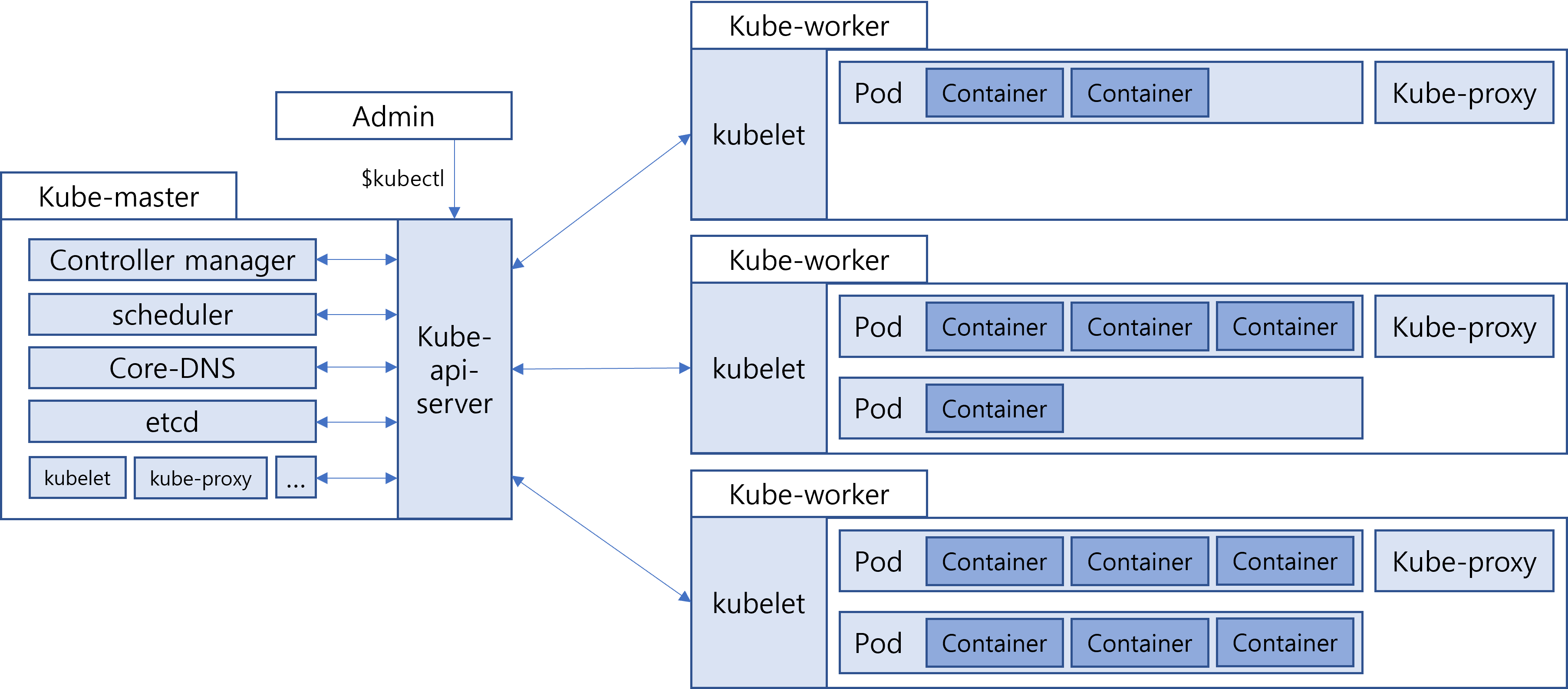
Terminology
-
k8s Cluster
Master Node + Worker Node -
Node
Physical computing environment, let's distribute them by AWS instance. -
Master Node
Manages Worker nodes. It's also called Control Plane, probably named because admins interface through the Master Node's api server. -
Worker Node
Receives commands from Master Node and manages and runs Pods. -
Pod
A group of containers. It's implemented to bundle containers and operate as a single application.
Master Node Components
-
kube api server
It's an interface that delivers commands to components within the cluster. Admins can command the master node through kubectl commands. -
controller manager
Runs 'controller' processes. 'Controller' processes monitor the cluster's state and transition the current state to the desired state. -
scheduler
Schedules which node to place pods that haven't been assigned to a node. -
etcd
Information about components within the cluster is stored in Key-Value format. -
Core-DNS
DNS used when looking for specific domains within the cluster (It seems there are cases where domains are used internally. Can domain names be specified for worker nodes?)
Worker Node Components
-
kubelet
Function 1: Interface that receives commands through kube api server. Function 2: Monitors Pods to ensure they operate normally. -
kube-proxy
Provides proxy services on all nodes and manages network rules. -
pod
A group of containers. Each Pod is assigned a different IP address, and containers within the Pod can reference each other via localhost.
What to Do Next
Let's create three AWS instances and designate one as Master and two as Workers. If possible, let's create a simple WAS with express and run pods on Worker nodes.