ENKI RedTeam CTF
A Developer's Take on a Hacking (RedTeam) Competition
I participated in a hacking competition. A friend who studies security was entering, and I thought — why not give it a shot? With five years of development experience under my belt, I figured I'd dip my toes in.
Before We Begin
The competition I entered was the ENKI RedTeam CTF. (link)
Before diving into the review, let me briefly cover some security terms for those unfamiliar — I didn't know them myself when I signed up.
RedTeam: A team that executes infiltration scenarios from an "attacker's" perspective to identify security vulnerabilities. The defensive side is called the "BlueTeam." CTF (Capture The Flag): Literally "capture the flag." It's a hacking competition where you exploit system weaknesses to find hidden strings (Flags) and earn points. ENKI: A fairly large domestic cybersecurity company. Apparently they held this competition to recruit white-hat hackers — offering job opportunities to roughly the top 30 finishers.
So in short: it's a penetration (hacking) contest hosted by ENKI, ranked by who can best find FLAGS (strings).
Competition Start
Honestly, I hadn't had much exposure to the security field. I dropped my information security course in school, and for the security certification exam, I barely scraped through the written portion before dropping the practical as well. Security requires an unusually deep breadth of knowledge — and I thought, what's the point of cramming the day before? So I just went to bed early and decided to throw myself at it with a fresh head.
The competition ran online from 11 AM Saturday to 11 AM Sunday — 24 hours total. I jumped in right at 11 and started by surveying the problem types.
The first type provided client/server source code along with the target website URL. The second type gave only a website URL with no additional information. (For this type, you had to gain root access to the target server through the website and retrieve the flag.)
After sizing up the problem types, I fired up multiple Claude Code instances across several terminals.
In a somewhat strategic move, I also found and applied a senior-security-engineer skill I found online.
With my quick fingers and Claude's sharp mind, nothing felt impossible.
I loaded four problems across four terminals, delegated the brainwork to Claude, and grabbed a coffee with the casual confidence of "what if I solve these too fast?"
Disappointed in Claude
My role was reduced to pressing Y across four terminals. After about an hour of Y-clicking labor, something felt off. Claude was trying various approaches, but it couldn't find any exploitable vulnerabilities — it kept getting stuck on specific cases and spinning its wheels with meaningless attempts.
To make things worse, I hit Claude Code's session limit. All I had left was Gemini's free plan and my own brain.
Solving It Myself
I picked one problem in a domain I knew at least something about and dug in deep.
The service was structured with a Next frontend serving the web interface and a Flask + Redis backend that wasn't exposed externally. I had completed most of the source code analysis. The conclusion: I needed to get Next to send an internal request to a specific Flask endpoint. But how exactly? Every path in the source code that made internal calls seemed off-limits.
I got stuck there. Six hours passed. It was 5 PM.
Claude Is a God
Once the Claude session limit reset, I shared what I'd figured out and we brainstormed together on how to crack it.
During that conversation, a promising idea came up.
The suggestion was to abuse Next's next-image feature — and that turned out to be the key.
Next fetches images from the internal filesystem or specific external endpoints to optimize and resize them.
This can be triggered with a URL like https://nextservice.com/_next/image?url=https://img.com/cat.png, and the idea was to pass an internal endpoint (127.0.0.1:5000/get-image) in the ?url= query parameter.
The moment I saw the idea I thought, this is it. But when I actually tried calling ?url=http://127.0.0.1/get-image, it was blocked by Next's own policy.
Turns out Next blocks internal calls to 127.0.0.1 and localhost by default.
I complained to Claudemon that it wasn't working, and it introduced me to a technique called DNS Rebinding. The idea is to return different DNS responses at the time of the URL check versus the time of the actual data fetch, bypassing IP-based validation.
function fetchImage(url) {
  const host = url.getHost();
  if (host === '127.0.0.1') { // at this point: a legitimate public IP
    return null;
  }

  const image = fetch(url); // at this point: resolves to 127.0.0.1
  return optimize(image);
}
Since Next blocks calls in a form like the above, the trick is to pass the IP check with a legitimate public IP, then have the DNS resolve to 127.0.0.1 by the time fetch() is called.
Using this method, I finally obtained the FLAG. It was 7 PM — eight hours after I had started on the problem.
Getting that FLAG gave me a rush of dopamine I hadn't felt in a long time. When was the last time I spent eight straight hours grinding on a single problem? Claude's contribution was huge, of course — but I'd like to think I deserve some credit too for understanding Claude's guidance and executing it correctly.
Results
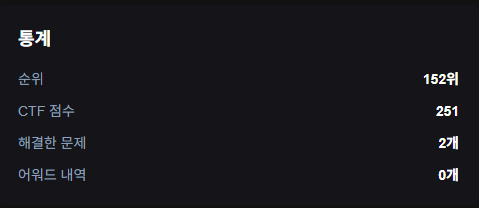
I solved exactly one problem through sheer persistence. (The scoreboard shows 2 — one problem was counted as solved just for joining the Discord server.)
Takeaways
I tried another problem after that, but one missing link kept blocking progress.
The takeaway: even having a passing familiarity with the domain makes it hard to solve even a single problem.
Still, I feel a genuine sense of accomplishment for having solved at least one.
Disclaimer
ENKI's official writeups and solutions for other problems are available at this link.
This post was written to document a personal learning experience. If there are any copyright or other concerns with this article, please contact
wichan.dev@gmail.com.