Ponytail and Caveman: A Review
Three months using the currently popular Ponytail and Caveman skills
Overview
At work, the people who use AI well seem to be constantly hitting their token limits, then paying for personal subscriptions when those limits are not enough. I am also trying to use as much AI as possible at work to keep up with the industry.
I figured I should understand the tools before using them well, so I looked into current trends and found that the Ponytail and Caveman plugins were popular. I do not know how to evaluate AI quantitatively yet, so this is simply a subjective summary of my experience.
Test environment
- AI tool: Codex
- Model: gpt-5.6-terra
- Reasoning level: Medium
Ponytail

Introduction
When using AI, it often creates features that were never requested or defensive code that has no value within the current scope. I usually check for those things myself just before committing, but that takes a fair amount of time.
Ponytail is a plugin designed to address that problem.
You know him. Long ponytail. Oval glasses. Has been at the company longer than the version control. You show him fifty lines; he looks at them, says nothing, and replaces them with one.
Ponytail puts him inside your AI agent.
How does it work?
Skill behavior
1. Does this need to exist?   → no: skip it (YAGNI)
2. Already in this codebase?  → reuse it, don't rewrite
3. Stdlib does it?            → use it
4. Native platform feature?   → use it
5. Installed dependency?      → use it
6. One line?                  → one line
7. Only then: the minimum that works
When writing code, Ponytail checks several steps to keep the implementation short:
- Is this feature necessary?
- Is it already available in the codebase?
- Does the standard library provide it?
- Does the platform already provide it, such as HTML or the OS?
- Can an installed dependency provide it?
- Can it be done in one line?
- Otherwise, implement only the minimum that works.
Following these steps prevents unnecessary code from being generated.
Intensity modes
/ponytail [lite | full | ultra | off]
Test 1 (Full vs. Off)
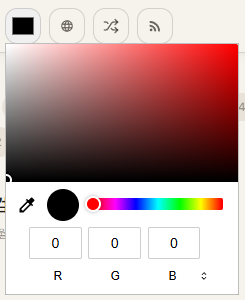
I asked it to add a feature directly to this blog's header.
Prompt: Build a ColorPicker component that changes color-accent, and add it to the top navigation.

Full
<input
  type="color"
  defaultValue="#e64900"
  aria-label="Choose accent color"
  onChange={(event) =>
    document.documentElement.style.setProperty("--color-accent", event.target.value)
  }
/>
Off
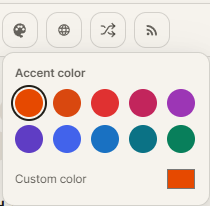
With Ponytail disabled, the implementation added a Headless UI popover, preset palette, localStorage persistence, custom-color selection, and alpha variants.
Result
- Full implemented only the requested color picker and CSS variable update.
- Off added a popover, predefined palette, localStorage, custom colors, and alpha colors.
In production, we should build to the specification, not to an AI's imagination. I therefore preferred Full, which implemented only the requirements.
Test 2 (Full vs. Lite)
Prompt: Add a button to the left of RSS in the top nav that goes to a random post.
Full
window.location.assign(hrefs[Math.floor(Math.random() * hrefs.length)])Lite
import { useRouter } from "@/i18n/navigation"

router.push(hrefs[Math.floor(Math.random() * hrefs.length)])
Result
- Full used
window.location.assign()for navigation. - Lite used the project's
useRouter().
This result was interesting: in Next.js, useRouter() avoids unnecessary rerendering, and it is also this project's convention. On this point, Lite wins.
Test 3 (Spring Framework, Lite vs. Off)
Prompt: Add file uploads to the project. Do not store files in the file system; keep them only in memory.
Lite
The implementation stored only bytes and a filename in a ConcurrentHashMap, and used Spring's standard ResponseStatusException for errors.
Off
The implementation stored the content type too and used the project's existing BizException and FileErrorCode conventions.
Result
- Lite saved the minimum information and used Spring's default exceptions.
- Off also saved the content type and followed the project's existing exception design.
Even without that context in the prompt, Off recognized that custom error codes should be used and produced a better fit for the project. Off wins.
Conclusion
- For the ColorPicker, Full's requirements-only result was best.
- For the routing button, Lite's implementation aligned best with Next.js.
- For the file service, Off's understanding of the existing project structure was best.
Ponytail produced worse results than I expected. The issue may be a lack of prompt specificity: because it follows instructions so literally, it sometimes produced results close to a wrong answer in tests 2 and 3.
It may be useful when the prompt is made more specific through a harness or a Claude.md-style project guide. To use Ponytail well, more specific prompts seem necessary.
Additional feature: audit / review
Ponytail can also point out bloated code in the current project or commit.
/ponytail-audit   # audit the project source
/ponytail-review  # review the latest commit
Test output
stdlib: Remove the unused MyBatis configuration and two dependencies; JPA is the only persistence layer in use.
delete: Remove an uninjected, uncalled RestClient bean and the dedicated Apache HttpClient dependency.
delete: Remove the empty UserCommandService; there is no replacement.
yagni: Remove the ErrorCode interface with a single implementation; restore it only when another implementation is needed.
net: about -45 lines and -3 direct dependencies.
These days I use /ponytail-review only to check that unnecessary code has not slipped in before I commit.
Caveman

Introduction
Caveman is a plugin that makes an AI speak briefly, like a caveman.
why use many token when few do trick Make your AI coding agent talk like a caveman. Same answers, 65% fewer output tokens. Brain still big. Mouth small.
How does it work?
It does not interfere with reasoning. It changes only the final response so that it is brief and caveman-like.
The repository describes two expected benefits:
- It reduces the number of tokens used in responses.
- By generating only the key points, it can reduce the time people need to understand a response.
Test
Prompt: Tell me when I should choose denormalization while designing a database.
Off
The normal response explained read-heavy workloads, expensive joins and aggregations, strict latency requirements, snapshots of historical values, and reducing distributed-system dependencies. It also covered the need for a source of truth, an update strategy, acceptable staleness, reconciliation, and measurements before applying denormalization.
Full
The Full answer condensed this into practical cases: dashboards, search APIs, large joins, history snapshots, distributed databases or caches, and expensive repeated calculations. It advised verifying measured read bottlenecks, update rules, inconsistency recovery, and alternatives such as indexes and caching.
Lite
The Lite answer was shorter still: choose denormalization when read performance matters more than write cost; use it for frequent JOINs or aggregations, strict latency targets, repeated calculations, reporting, asynchronously updated data, and separate read/write models such as CQRS or materialized views. Keep the source normalized and treat duplicated fields as derived values.
Three months of use
- Without it, long responses made it annoying to find the key point.
- Full was so terse that new concepts were sometimes difficult to understand.
- Personally, Lite provides the most appropriate answer quality, so I use it.
Aside
A benchmark found that Caveman can actually increase token usage.
Does Caveman Actually Save Tokens? I Built a Benchmark to Find Out
- Enabling Caveman increases the initial context because the skill must be loaded.
- In a short session, that initial overhead can remove almost all of the benefit.
In short, token usage is not the important part—and may even increase. The real advantage is reducing the cognitive time needed to grasp the key points from a short answer.